Friday, April 16. 2010
VOR-/ÖBB-Fahrpläne mit Android abrufen

Ich bin unlängst von einem Symbian-Handy auf ein Android umgestiegen und wollte die Applikation SCOTTY mobil von den ÖBB dort weiterbenutzen, um bequem aktuelle Zugverbindungen bzw. -verspätungen abrufen zu können, jedoch: Es gibt diese App nicht für Android, und auch nicht auf absehbare Zeit. Daher liste ich hier einmal die Möglichkeiten auf, die bleiben. Eins vorweg: Sie sind allesamt höchst unbefriedigend. 
- Webbrowser: Die schnelle Lösung in der Not ist, mit einem Android-Browser Fahrplan.OeBB.at abzurufen. Davon gibt es leider keine offizielle Mobilversion, ich kenne nur die in das WAP-Portal Live.A1.net integrierte für A1-Kunden. Abgesehen davon, dass dies nur online erfolgen kann, ist mir keine Möglichkeit bekannt, Verbindungen für einen späteren Abruf zu speichern. Start, Ziel und Zeitpunkt müssen immer wieder neu eingetippt werden, was eine Qual ist, wenn man nur „mal eben“ vorab nach Verspätungen sehen will. Apropos: Diese lassen sich ausschließlich auf diese Weise erfragen.
- SCOTTY mobil mit Tricks doch auf Android nutzen: Ich kenne zwei Möglichkeiten, um eine (J2ME) Java-App in ein Android-Format zu konvertieren:
- J2ME Runner: Diese via Android Market installierbare App erlaubt es, das originale .jar/.jad von den ÖBB in ein .apk zu konvertieren und zu installieren. Ein Startversuch führt dann aber kommentarlos und umgehend zum Homescreen zurück.
- MicroEmulator: Ich habe mir tatsächlich die Mühe gemacht und auf einem PC eine komplette Android-Entwicklungsumgebung eingerichtet. Mit ein paar Kniffen erstellt man damit ein Paket, welches nach Installation am Handy tatsächlich ein SCOTTY mobil startet, in dem sich sogar Haltestellen auswählen lassen! Schickt man jedoch die eigentliche Suchabfrage ab, verabschiedet sich die App reproduzierbar mit einem Force-Close. FAIL.
- Qando.at deckt leider nur den Ostösterreichischen VOR ab. Mit der oben erwähnten MicroEmulator-Methode kann man die Java-App auch auf Android installieren und sogar nutzen, inklusive Touchscreen. Nachteil: Die Android-Softwaretastatur funktioniert nicht, nicht einmal eine Hardwaretastatur wie beim Motorola Milestone. Man ist vollständig auf die integrierte, äußerst schlecht bedienbare und winzig kleine Softwaretastatur angewiesen. Verbindungen lassen sich zwar als Favoriten speichern, die Fahrpläne werden aber stets nur online nachgeschlagen; Verspätungen sind keine abrufbar.
- FahrplanAT: Diese Android-App findet man eventuell auch als TimetableAT im Android Market, benutzt aber offenbar kein offizielles ÖBB-API, sondern scheint unter der Haube einfach die Suchabfragen via Webinterface abzusetzen und die Ergebnisse herauszuparsen. Den selben Irrweg scheint (laut Code) auch die freie und unfertige App open-scotty einschlagen zu wollen. Diese Methode ist zum Scheitern verurteilt und steht und fällt mit dem Wohlwollen des offiziellen Betreibers der Website, also der ÖBB. Die Deutsche Bahn etwa, die übrigens sowohl eine mobile Website als auch eine native Android-Version anbietet, kennt solche Fremd-Apps und duldet sie nur, solange deren Abfragen sich nicht störend auswirken. Immerhin bietet FahrplanAT eine GPS-Lokalisierung und eine Historie bereits abgefragter Verbindungen an. Abrufe erfolgen aber wiederum stets online, ohne Daten über Verspätungen.
Saturday, February 27. 2010
Camcorder FAIL

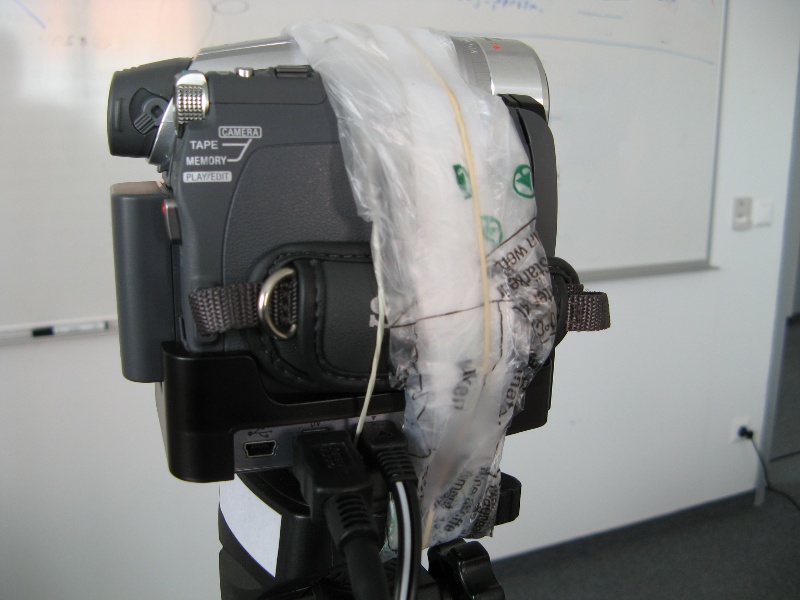
“It’s a Sony!” 
This camcorder relies on a docking station to provide connectors for power, FireWire and USB. However, the dock didn’t get a tripod mount. So, you have to commit something like that to get a live DV stream. In addition, the camera is only loosely attached to the dock, making an additional rubber band necessary.
Thursday, February 25. 2010
Work around the image scaling "bug"

Eric Brasseur explained a “bug” in the scaling algorithm of current image processing software. It’s not really a bug, technically, or mathematically. Calculating the numerical average of the surroundings of a pixel as the new color value is a pretty correct approach to scale an image down—if it’s seen as a data matrix. Rather, it’s visually not the thing you’d expect.
Technically speaking, the problem is that “the computations are performed as if the scale of brightnesses was linear while in fact it is an exponential scale.” In mathematical terms: “a gamma of 1.0 is assumed while it is 2.2.”
Here’s an example of what might occur:
The wrong way:
- Take this image as a start:

- Simply scale it down to 50%:

Obviously, this might not be what you intended.
The right way:
Continue reading "Work around the image scaling "bug""
Droid and iPhone dislike cheap USB chargers unless...
... you have an electronic hacker in your neighborhood. I bought the cheap Chinese solar USB charger revolt “4 Seasons” and wanted to use it to charge my Motorola Milestone/Droid or other devices while travelling by train or bike or during a hike. Unfortunately, it only provided power to “dumb” devices like not-so-smart phones or USB On-The-Go hard disks. When I connected it to my Milestone, the phone didn’t jump to the charging state. WTF? It turned out that modern smartphones like Milestone/Droid or iPhone rely on a properly implemented USB standard, what means that it’s not enough that the two outermost USB pins carry the needed voltage, but the inner pins must also provide a minimal “data voltage”. The problem is described here, and here is a DIY solution.
Thanks go to my work mate Wolfi for hacking the solar charger successfully.
Tuesday, February 23. 2010
SCOTTY mobil (vorerst) nicht für Android
From: me
To: ÖBB
Date: 2010-01-26
Guten Tag!
Wird es eine native Version von ScottyMobil für Handys mit dem Android-Betriebssystem geben? Ich hatte die Applikation auf meinen vorigen Handy mit Symbian-Betriebssystem genutzt und vermisse nun eine Möglichkeit, häufig abgefragte Fahrpläne ohne Serververbindung abrufen zu können.
Das WAP-Interface (via A1.net) ist sehr rudimentär, und das normale Webinterface ermöglicht keine Speicherung häufig benutzter Verbindungen, so wie ich es am alten Handy benutzt habe.
Da es eine iPhone-Applikation gibt, erwarte ich eigentlich auch für das sich immer weiter verbreitende Android-Betriebssystem eine native Applikation von ScottyMobil. Ist etwas in dieser Richtung geplant?
Ich freue mich über Ihre Rückmeldung.
mfg
From: me
To: ÖBB
Date: 2010-02-15
Ich habe diese Anfrage schon einmal am 26.01. verschickt, jedoch noch keine Antwort erhalten. Meine Frage:
[...]
From: ÖBB
To: me
Date: 2010-02-23
Sehr geehrter Herr Mag. Paukner,
leider ist es noch nicht möglich SCOTTY mobil auf einem mobilen Endgerät mit dem Betriebssystem „Android“ zu verwenden. Eine Entscheidung über die Weiterentwicklung und Ausweitung des Dienstes ist noch offen, wodurch keine genauen Aussagen getroffen werden können. Sobald es diesbezüglich Neuigkeiten gibt, erfährt diese der Kunde unter www.oebb.at/scottymobil
Wir hoffen, dass Sie auch weiterhin dem umweltfreundlichen Mobilitätsanbieter Bahn vertrauen.
Mit freundlichen Grüßen
Für die ÖBB Personenverkehr AG
Tja, das ist Schade. Auf welche Weise sich dennoch – wenn auch nur in unbefriedigendem Ausmaß – die Fahrpläne von VOR/ÖBB/Wiener Linien auf Android-Handys abrufen lassen, erzähle ich in einem separaten Artikel.
Tuesday, February 2. 2010
Syncing Symbian to Google: SOLVED
I found out how to get all my calendar entries into Google: Sync the events into a single iCalendar file using OpenSync’s Sunbird calendar plugin and import this into your Google calendar. In Sunbird I exported an empty calendar into a local iCalendar file and used this as a starting point; a plain empty file was not enough.
Unfortunately, there is a known annoying bug preventing entries that are older than one month from getting pushed to your Android smartphone—only noted as a “small” bug by Google, though. You’ll have to re-save those entries in the web calendar to update their modification time and have them synced to your phone. This, however, won’t work by updating their LAST-MODIFIED time stamps in the iCalendar file prior to the import.
Saturday, January 16. 2010
Aftermath in the truest sense

Two years have passed since I declared the project “Master’s thesis” accomplished. Continuing with a PhD was already unlikely at that time and became even more unlikely since then. However, O. Christensen, the author of one of my main sources, asked me a few months ago to contribute to a book chapter he was writing together with my advisor, Prof. H. Feichtinger. Parts of my thesis might thus show up in a book about imaging from a major publisher of mathematical works. We submitted our result this week. I won’t tell more at this time, except that it was fun to dig through the material again. It might take a few months until a decision is made by the publisher. Whatever the result, I don’t expect it to lead me back to academia.
Friday, January 15. 2010
Syncing Symbian to Google hardly possible
As I’ll get my Motorola Milestone on Monday (W00t! W00t!) I tried to get my data from my Symbian cell to Google somehow. I made several syncing attempts:
- Using OpenSync on my Debian box
- Syncing from Symbian to Gnome Evolution: That was my regular task to get contacts and calendar entries backed up to Evolution. I had to take care to never let the slow sync occur after an attempt was unsuccessful, e.g. when I forgot to turn on Bluetooth on the cell. This would have doubled all entries. I had to remove the lock file and rely on backups of ~/.opensync-0.22 and ~/.evolution quite a few times.
I also had to take care to not sync too many entries at once. The process froze when the counter reached 140 items. I had to configure a size limit (of 500 bytes) to have the process jump over that limit (and ignore some entries).
I tried to use this as starting point to get things into Google, as there’s a plugin for it. - Evolution to Google: For every item that should have been synced to Google, a Python error showed up, what took 2–3 seconds for each item. Syncing my >1000 entries thus lasted forever—and froze at a certain point, apparently due to Google’s limitation of connection attempts. A retry started to create duplicates. FAIL.
- Symbian to Google: Just the same as above. FAIL.
- Files to Google: I tried to be smart by first syncing my cell to plain files on the PC and then using subsets of those to sync them to Google incrementally. But the same thing as before happened, and at each step the entries from the previous step were duplicated. FAIL.
- Building a recent SVN version from source: That was hard. I had to hack the code by myself to get it compiled. But then it FAILed at runtime.
- Symbian’s Sync: There’s a help page at Google that explains how to sync (only) contacts from Symbian to Google using on-board software. That even worked! But the contacts got synced without their birth dates—this seems to be a Symbian limitation.
- Mail for Exchange: Another help page at Google shows how contacts and calendar entries can be synced to Google using this free app by Nokia. But the name keeps up to its promise: It’s crap. When the “System error” comes up, there’s no way to get rid of it. FAIL.
- GooSync: This proprietary app finally made my day. The Lite trial version only allowed to sync a time window of −7/+30 days. So I had to get a pricey premium account to enjoy a ±365 days window. This, however, still leaves older entries at my previous places. This setup seems to work so far for calendar entries, but contacts, however, don’t get updated to Google. And tasks can only be synced to GooSync.com, not to Google.
Sigh. Luckily, not much of my data should change within those few days remaining.
Calendar

|
October '26 | |||||
| Mon | Tue | Wed | Thu | Fri | Sat | Sun |
| 1 | 2 | 3 | 4 | |||
| 5 | 6 | 7 | 8 | 9 | 10 | 11 |
| 12 | 13 | 14 | 15 | 16 | 17 | 18 |
| 19 | 20 | 21 | 22 | 23 | 24 | 25 |
| 26 | 27 | 28 | 29 | 30 | 31 | |
Quicksearch
Categories

Show tagged entries
Follow me


